Directory search is distribution
The plugin search box in wp-admin is where users discover plugins. The first few results take most of the installs for a phrase; page two barely exists.
See your position for every keyword people type into the plugin directory — weekly checks on Free, daily on paid plans, with 30-day history and the competitors ranking above you.
Free plan · Google sign-in · no card

Why it matters
Most installs begin with a search inside wp-admin or on WordPress.org. Slip from position three to twelve for your best phrase and downloads fall — with nothing in your stats to explain why.
The plugin search box in wp-admin is where users discover plugins. The first few results take most of the installs for a phrase; page two barely exists.
Releases, review velocity, tested-up-to versions and rival launches reshuffle results constantly. A one-off check tells you nothing about direction.
Scheduled WordPress.org keyword rankings turn guesswork into evidence: what you shipped, what moved because of it, and what that movement was worth.
How it works
No plugin to install, no API keys, no tag manager. Add a slug, add the phrases you care about, and let the scheduled checks build your rank history.
Paste your slug or WordPress.org URL. We pull the official name, icon, active installs, rating and version straight from the directory.
The phrases people actually type — “contact form”, “backup”, “google reviews widget”. Track head terms and long tail side by side.
We check the directory on your plan’s cadence and record every result, so trends, best-ever ranks, visibility and estimated clicks build themselves.
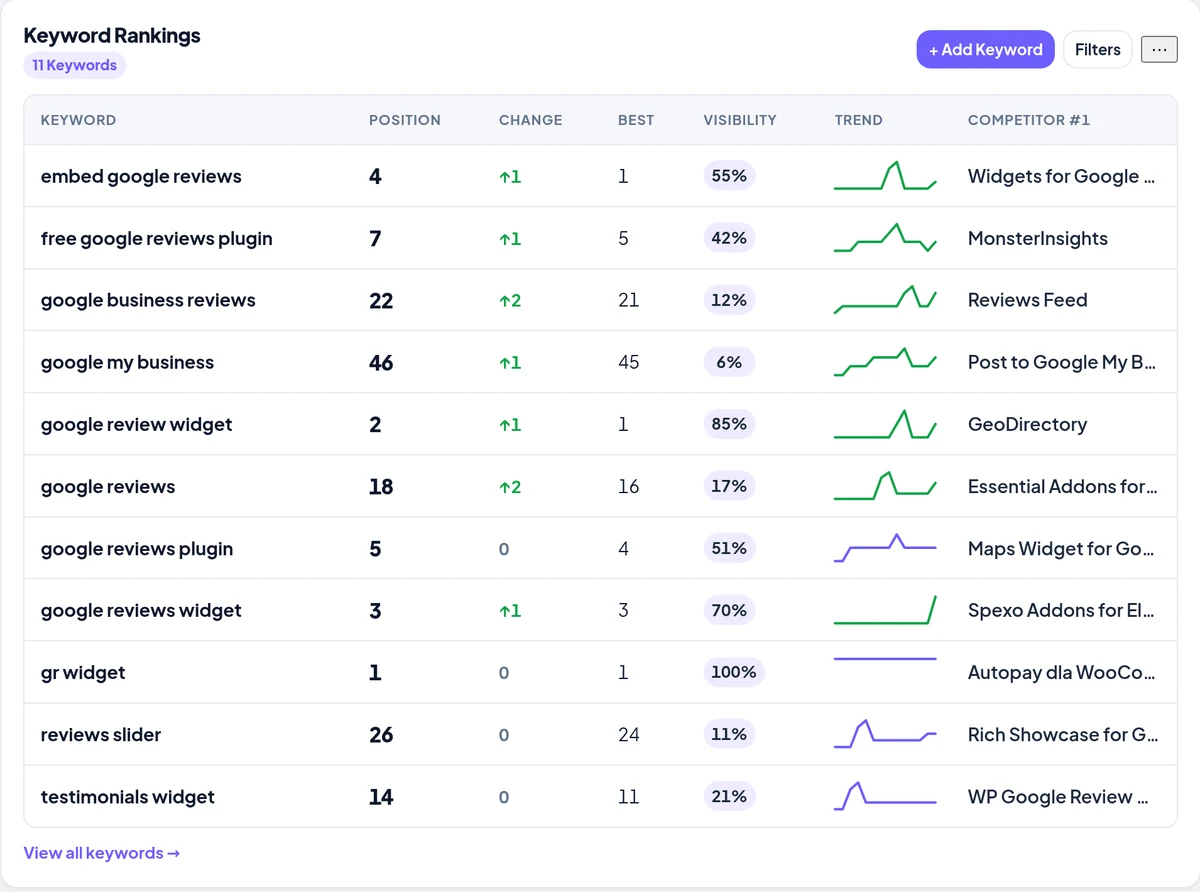
Keyword rankings — position, change, best, visibility and trend
The difference
Google SEO tools measure google.com. WP Plugin Rank measures the results your future users see inside WordPress — a different index, a different ranking model and a different audience.
Competitive view
Each check records the plugins around you in the results, so you always know who is actually competing for a phrase — and how much directory visibility they hold.
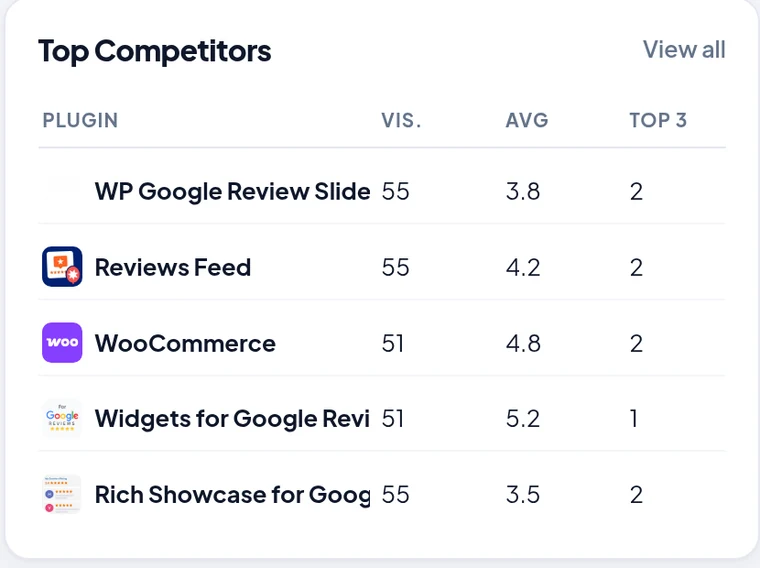
Top competitors by directory visibility
Plans
Start free on one plugin and three keywords with weekly checks. Move up when you want daily checks and a bigger keyword set.
$0forever
No card required
$3.99/month
or $39/yr — save vs $47.88 monthly
Everything in Free, plus
$8.99/month
or $89/yr — save vs $107.88 monthly
Everything in Indie, plus
$24.99/month
or $249/yr — save vs $299.88 monthly
Everything in Studio, plus
Introductory pricing — lock in today’s rate; it won’t go up for your subscription when we raise prices later. Every plan includes competitor tracking, 30-day rank history (weekly snapshots on Free, daily on paid) and visibility scoring. See the full plan comparison or talk to us about agency volume.
Questions
It tracks your plugin’s position in WordPress.org plugin directory search results for every keyword you add — the same ordering people see in the wp-admin plugin search box. Each check stores one position per keyword, so you build a real rank history instead of a one-off number.
Weekly checks on Free. Daily checks on paid plans. Studio and Agency can also run on-demand checks from the dashboard — handy right after you ship a release.
WordPress.org. We measure the plugin directory’s own search results, not google.com. If you also want Google SERP data for your marketing site, keep using a traditional SEO tool — the two answer completely different questions.
Yes. Every check records the plugins ranking around you, so each keyword shows its current number one and you get a competitor board ranked by directory visibility, average position and top-3 count.
Add the phrase on the Keywords screen. The next check records its position, and from then on you can monitor plugin keyword positions with trend sparklines, best-ever ranks and a visibility score.
No. WP Plugin Rank reads public directory data, so there is no plugin to install, no API key and no code added to your site. Paste your slug and tracking starts.
Yes. “Continue with Google” creates your account in one step with no password to set. You can also sign in with an email and password if an admin created your account for you.
Every plan keeps rank history for the last 30 days. Free stores weekly snapshots (about four or five points in the window); paid plans store daily snapshots (about thirty), so charts and trends are much denser when you upgrade.
Free covers 1 plugin and 3 keywords with weekly checks. Indie is 1 plugin and 25 keywords, Studio 5 plugins and 100 keywords, and Agency 20 plugins and 500 keywords — all with daily checks.
Paid plans are monthly or yearly subscriptions through PayPal. Yearly costs less than twelve monthly payments — Indie is $39/year instead of $47.88, Studio $89 instead of $107.88, and Agency $249 instead of $299.88. Introductory pricing — lock in today’s rate; it won’t go up for your subscription when we raise prices later. You can cancel from Settings at any time and keep your paid features until the end of the period you have already paid for.
Add your plugin, add your keywords, and let scheduled positions land in your dashboard. Weekly checks on Free, daily when you upgrade — no card required.